A Power over Ethernet adapter is a dedicated hardware device that delivers both electric power and high-speed data to a network-connected device over a single Ethernet cable. Imagine trying to deploy an enterprise-wide surveillance system across a massive warehouse facility, only to find your installation completely stalled by a lack of localized AC electrical outlets. You are forced to plan complex conduit runs, coordinate with electrical contractors, and pay thousands of dollars in permits and labor just to power a few essential hardware nodes. By implementing a reliable Power over Ethernet adapter , you can bypass the electrical grid entirely, running high-performance connectivity and power over a single low-voltage line.
What Is a Power over Ethernet Adapter?
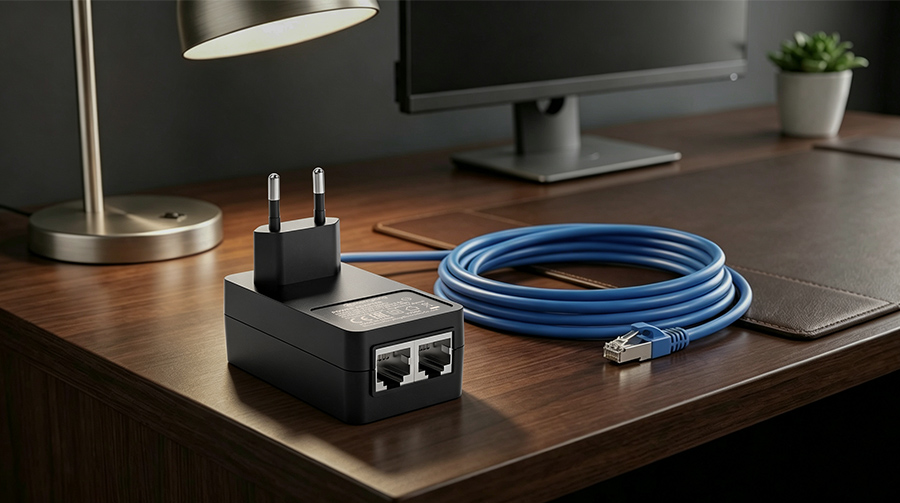
A Power over Ethernet adapter is a hardware component that injects DC voltage into standard network wiring. This device acts as a physical bridge, allowing you to easily supply power to distant ethernet-enabled hardware without standard wall chargers.
How Does It Simplify Modern Network Layouts?
You can instantly deploy network devices in locations that lack physical wall outlets. Here’s the deal: routing low-voltage Ethernet cables is significantly safer and cheaper than handling high-voltage electrical projects.
- Eliminates localized power supplies.
- Streamlines corporate infrastructure layouts.
- Cuts down on equipment clutter.
When you eliminate standard wall warts, you reduce the physical failure points of your network.
Is It a Universal Networking Solution?
This system works beautifully to connect old legacy components with cutting-edge network devices. Think about it: a high-quality PoE power adapter is engineered to convert AC mains electricity into highly stable DC current.
- Bridges older switch infrastructure.
- Supports gigabit communication speeds.
- Works over standardized Category cabling.
You will find that incorporating these devices into your deployment prevents costly hardware overhauls.
Key Takeaway: A Power over Ethernet adapter serves as the physical backbone for streamlined IoT deployment, blending power and data transmission into one cost-effective cable setup.
| Feature | Description | B2B Impact | |
|---|---|---|---|
| Combined Port | Delivers both low-voltage DC power and data | Reduces total cable runs | |
| Easy Integration | Works directly with non-PoE network switches | Extends legacy hardware lifespans |
The integration of high-grade internal transformers ensures stable power distribution without interfering with high-speed data packets.
How Does a Power over Ethernet Adapter Work?
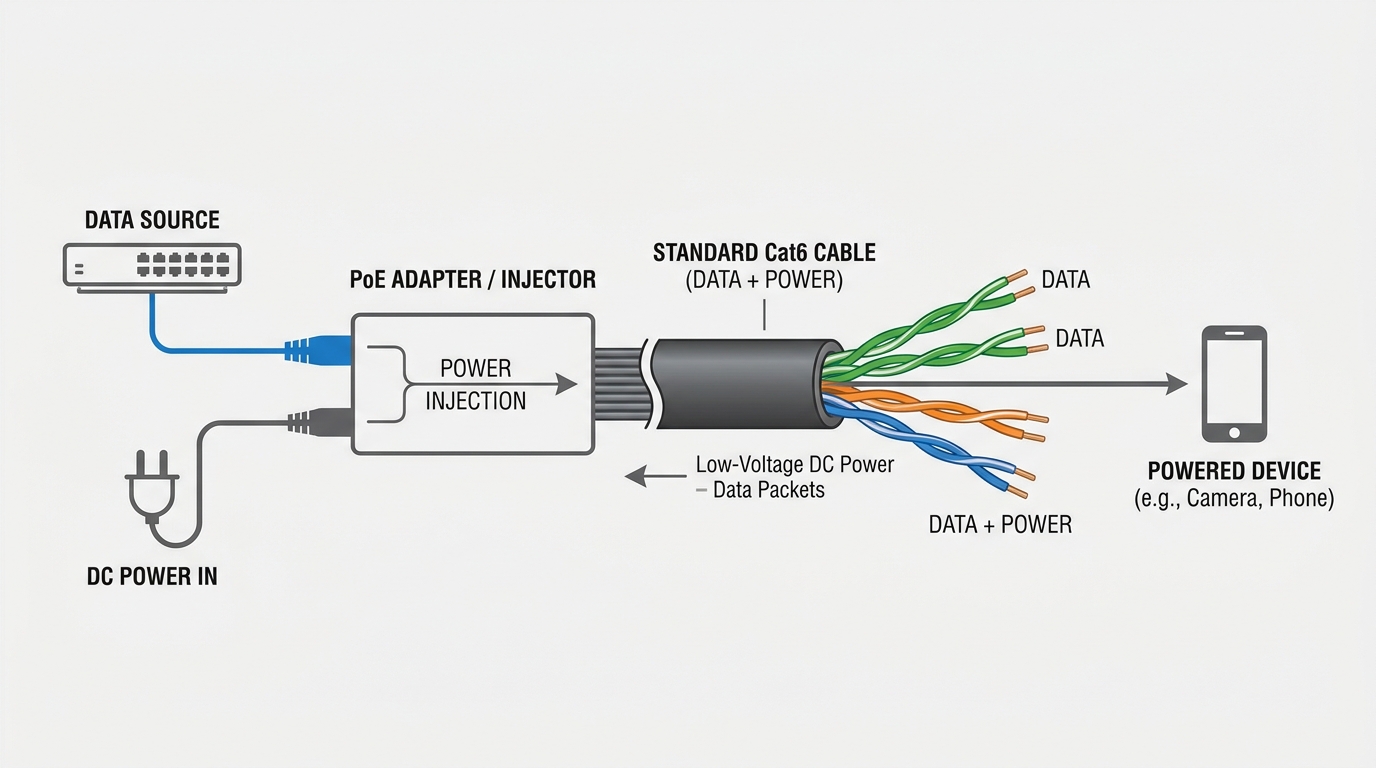
A Power over Ethernet adapter works by combining low-frequency DC electrical currents and high-frequency data signals onto a single network cable. This integration relies on the physical properties of twisted copper pairs to carry both signals without interference.
What Is the Physics of Single-Cable Power Delivery?
Standard Ethernet lines feature four twisted pairs of copper wires that carry data signals. But wait, there’s more: you can run safe, continuous DC currents on these same physical lines simultaneously.
- No interference with data frequencies.
- Uses center-tapped transformer coupling.
- Maintains consistent signal strength.
This physical separation prevents any voltage fluctuations from degrading your network speeds.
How Do Active and Passive Handshakes Differ?
Active adapters perform a safety handshake before sending full voltage down the line. You might be wondering: what happens if you plug in a device that doesn’t support PoE?
- Active PoE verifies device compliance.
- Passive PoE sends raw voltage constantly.
- Active handshake uses low-voltage testing signals.
Utilizing a smart PoE injector adapter prevents accidental electrical damage across your physical fleet.
Key Takeaway: Understanding the electrical handshake is critical to preventing hardware damage on non-compatible legacy devices.
| Handshake Phase | Action Taken | Safety Objective | |
|---|---|---|---|
| Detection | Sends a low-voltage test signal (2.7V–10.1V) | Identifies PoE signature resistance | |
| Power-up | Gradually ramps up voltage to standard levels | Prevents sudden electrical surges |
Handshake validation ensures that non-PoE legacy hardware remains completely safe when plugged into active network loops.
Why Do Network Devices Need a Power over Ethernet Adapter?

Network devices require a Power over Ethernet adapter to simplify deployment and establish a highly resilient central power backup system. By eliminating localized AC outlets, this device minimizes installation challenges in complex environments.
Can It Help You Bypass Commercial Electrician Fees?
Hiring licensed electricians to run high-voltage conduit inside concrete walls is incredibly expensive. Let’s face it: low-voltage cabling does not require complex municipal electrical permits.
- Saves hundreds of dollars per node.
- Speeds up physical installation schedules.
- Allows easy relocation of network hardware.
You can handle the entire low-voltage rollout with your existing IT staff.
How Does Centralizing Power Management Help You?
Connecting all your injectors to a single central UPS system ensures maximum network uptime. Think about it: if the local building power fails, your central battery backup keeps your security intact.
- Centralized battery backup management.
- Remote power cycling capabilities.
- Simplified hardware troubleshooting.
Deploying a rugged power adapter for network devices gives your IT department total control over system stability.
Key Takeaway: Centralizing your physical power backup through PoE injectors dramatically reduces potential downtime during critical outages.
| Architecture | Power Source | Outage Risk | |
|---|---|---|---|
| Decentralized | Individual localized wall outlets | High (No local UPS) | |
| Centralized PoE | Single server-room UPS backup | Minimal (Auto backup) |
Centralizing your remote hardware’s power footprint reduces operational vulnerability and streamlines disaster recovery protocols.
What Devices Commonly Use a Power over Ethernet Adapter?

A Power over Ethernet adapter is commonly utilized to run high-utility hardware nodes placed in physically demanding or hard-to-reach locations. These installations often include security cameras, enterprise wireless access points, and VoIP terminals.
Why Do Security Cameras Depend on PoE?
Outdoor security cameras must operate continuously without localized power failures or physical cable tampering. Choosing a robust power adapter for IP camera systems guarantees consistent power flow.
- Supports advanced PTZ motorized movements.
- Keeps internal camera heaters functional.
- Simplifies outdoor weatherproof cabling.
You can mount cameras on high light poles without worrying about localized electrical boxes.
How Do Wireless Access Points Benefit from This?
Enterprise Wi-Fi access points are usually mounted high on ceilings to maximize coverage. You might be wondering: how do you run power to the middle of a concrete ceiling?
- Bypasses ceiling outlet installation challenges.
- Ensures reliable gigabit-speed data backhaul.
- Simplifies hardware maintenance.
Using centralized power injectors means you do not have to climbing ladders to reset individual wall chargers.
Key Takeaway: Standardizing camera and access point power delivery via PoE reduces spatial limitations and ensures consistent operational performance.
| Device Category | Power Standard | Typical Mounting Location | |
|---|---|---|---|
| IP Cameras | PoE / PoE+ | High walls, ceilings, outdoor poles | |
| Access Points | PoE+ / PoE++ | Ceilings, high indoor corridors |
Selecting appropriate PoE delivery systems for remote nodes prevents performance bottlenecks and ensures maximum coverage.
How Is a Power over Ethernet Adapter Different From Standard Units?
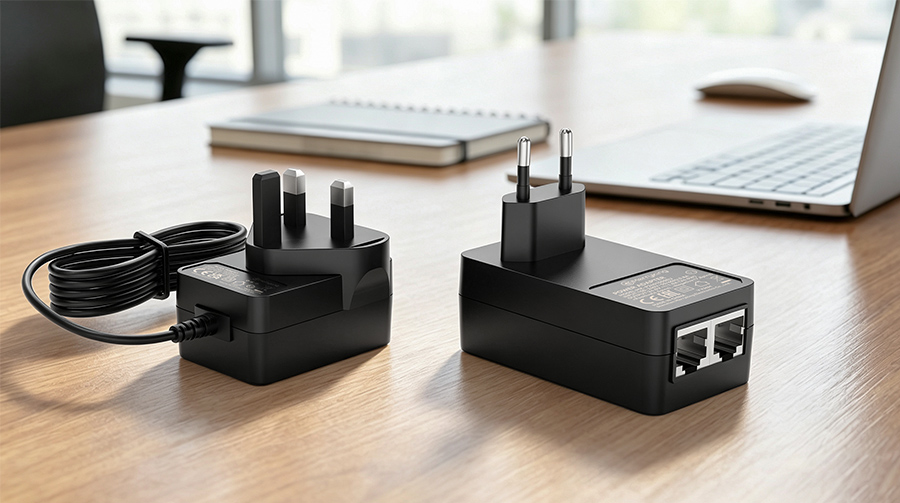
A Power over Ethernet adapter is completely different from a standard wall charger because it carries both electrical current and high-bandwidth data signals. While a standard adapter only delivers DC power, a PoE unit maintains data signal integrity over extended physical distances.
What Is the Difference Between Injectors and Splitters?
An injector adds electrical power to an existing data stream, while a splitter does the exact opposite. Here’s the deal: you can use a PoE splitter adapter to power older devices that don’t natively support PoE.
- Injectors combine power and data streams.
- Splitters separate power and data streams.
- Splitters output a separate DC barrel connection.
This dual compatibility allows you to transition your physical network slowly without replacing legacy devices.
Why Standard Adapters Cannot Match PoE Range?
Standard DC power cords experience extreme voltage drops over distances longer than a few meters. But wait, there’s more: PoE technology is specifically designed to push power up to 100 meters without signal degradation.
- Supports long cable runs up to 328 feet.
- Utilizes twisted-pair noise cancellation.
- Safely steps down high voltage at the device.
You will save thousands of dollars by utilizing long-range Ethernet lines instead of heavy copper extension cords.
Key Takeaway: Unlike standard chargers, PoE adapters are engineered to deliver high-bandwidth data and safe DC voltage over vast physical distances.
| Adapter Type | Combined Data+Power Output | Maximum Cabling Distance | Primary Use Case | |
|---|---|---|---|---|
| Standard Charger | No (Power Only) | 2 Meters | Local Desktop Devices | |
| PoE Injector | Yes | 100 Meters | Remote Powered Devices |
Understanding the distinct differences in cable limits allows network architects to maximize operational coverage.
What Ratings Must a Power over Ethernet Adapter Support?
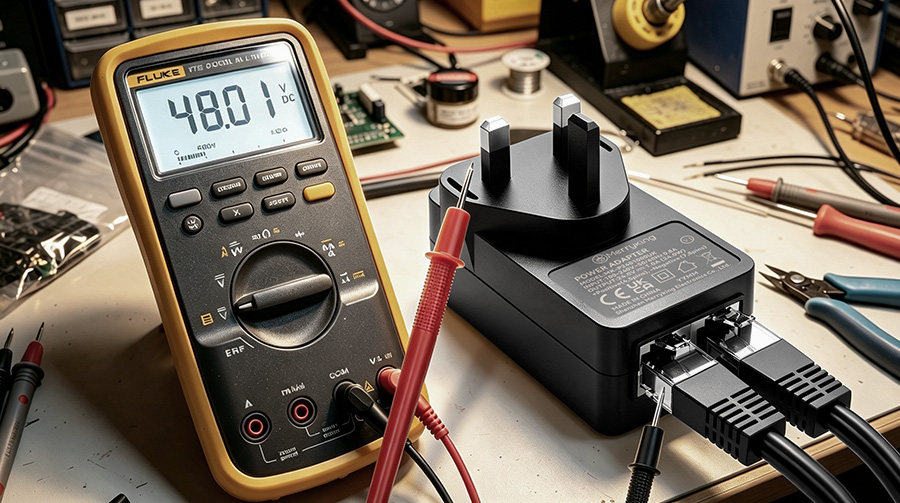
A Power over Ethernet adapter must support exact voltage ratings and efficiency standards to maintain safe operation across physical network environments. Choosing hardware with certified electrical profiles prevents catastrophic damage to your connected IT equipment.
Why Is a 48V Rating the Enterprise Standard?
Professional network infrastructure relies heavily on a high-efficiency 48V PoE power supply to minimize transmission losses. Let that sink in: sending lower voltages over long copper cables creates excessive heat and voltage drop.
- Minimizes current loss over 100 meters.
- Keeps operating temperatures exceptionally cool.
- Aligns with global telecom battery standards.
You will achieve much higher reliability when your devices operate on a steady 48-volt current.
How Do Efficiency Ratings Impact Operational Costs?
Inefficient adapters waste power as heat, raising your company’s monthly utility bills and cooling costs. Believe it or not: high-quality units comply with strict DoE Level VI efficiency requirements.
- Reduces thermal strain inside wall cavities.
- Lowers overall carbon footprint.
- Saves significant power over large deployments.
You should always verify that your supplier meets these modern efficiency benchmarks.
Key Takeaway: Choosing high-efficiency 48V rated adapters protects your infrastructure from overheating while lowering annual energy consumption.
| Voltage Profile | Common Applications | Efficiency Standard | |
|---|---|---|---|
| 24V Passive | Proprietary outdoor wireless bridges | DoE Level V / VI | |
| 48V Active | Standard corporate VoIP and security | DoE Level VI |
Selecting certified electrical designs protects thin network cables from localized heat accumulation and structural degradation.
Which PoE Standards Apply to a Power over Ethernet Adapter?
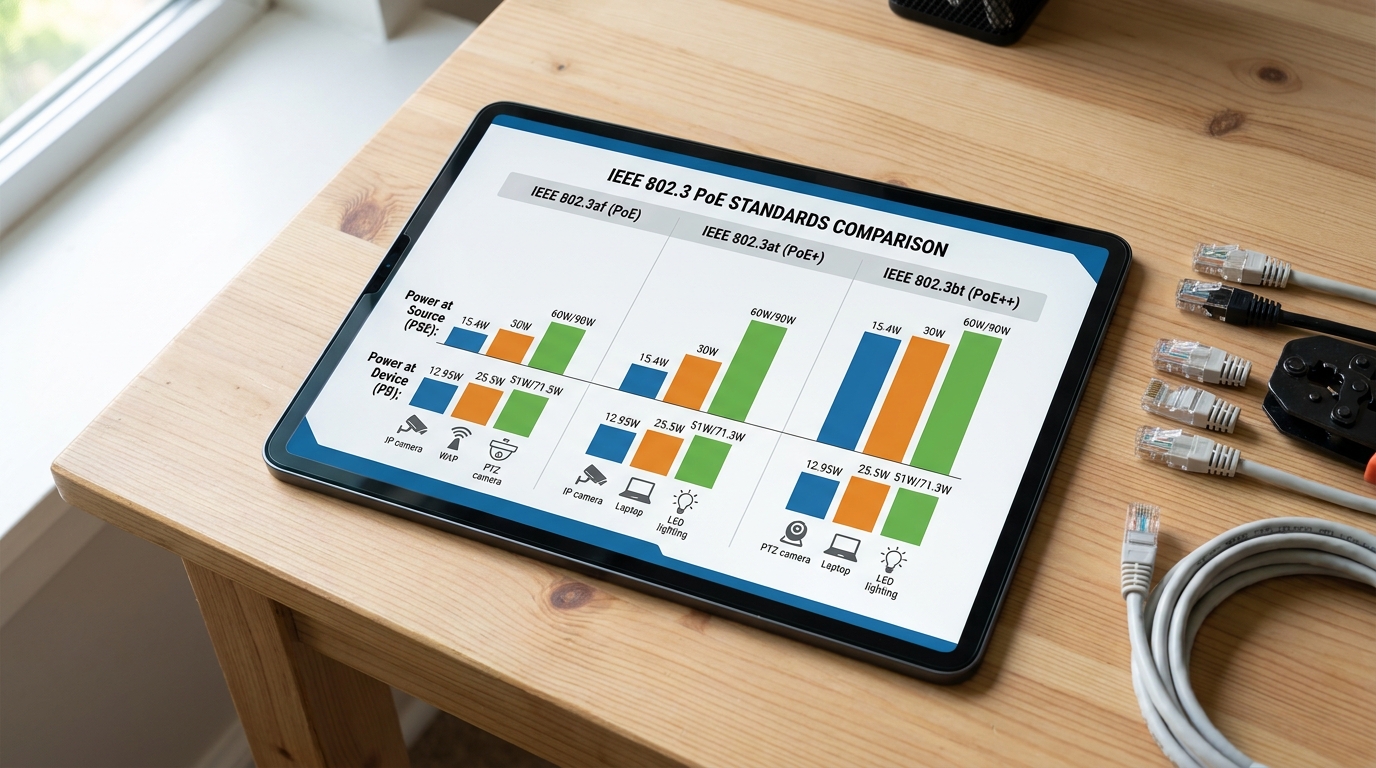
A Power over Ethernet adapter must comply with official IEEE 802.3 standards to guarantee cross-brand hardware compatibility and safe power allocation. These international rules define maximum electrical capacities and delivery methods across networks.
How Do 802.3af and 802.3at Standards Differ?
The classic standard is supported by an IEEE 802.3af power adapter , which delivers up to 15.4 watts of DC power. Best of all: upgrading to an IEEE 802.3at power adapter increases your available budget up to 30 watts.
- 802.3af: Ideal for low-power VoIP phones.
- 802.3at: Designed for dual-band access points.
- Both standards utilize standard RJ45 wiring.
You can easily run both types of devices on the same physical network backbone.
When Do You Need the High-Power 802.3bt Standard?
High-draw devices like smart LED lighting and heated PTZ cameras require extreme power levels. To support these, you will need a specialized IEEE 802.3bt power adapter capable of outputting up to 90 watts.
- Supports advanced smart building sensors.
- Powers heavy industrial IoT hardware.
- Utilizes all four twisted copper pairs.
You will prevent performance drops by matching your high-draw devices with certified bt-level power units.
Key Takeaway: Aligning your hardware choices with standardized IEEE profiles prevents power starvation and ensures seamless vendor interoperability.
| IEEE Standard | Common Name | Max Power at Source | Ideal Use Case | |
|---|---|---|---|---|
| IEEE 802.3af | PoE | 15.4W | Standard VoIP phones, basic IP cameras | |
| IEEE 802.3at | PoE+ | 30W | Dual-band wireless APs, alarm systems | |
| IEEE 802.3bt | PoE++ | 90W | PTZ outdoor cameras, smart LED fixtures |
Referencing official IEEE compliance charts prevents procurement errors and keeps remote devices running continuously.
What Safety Features Should a Power over Ethernet Adapter Include?
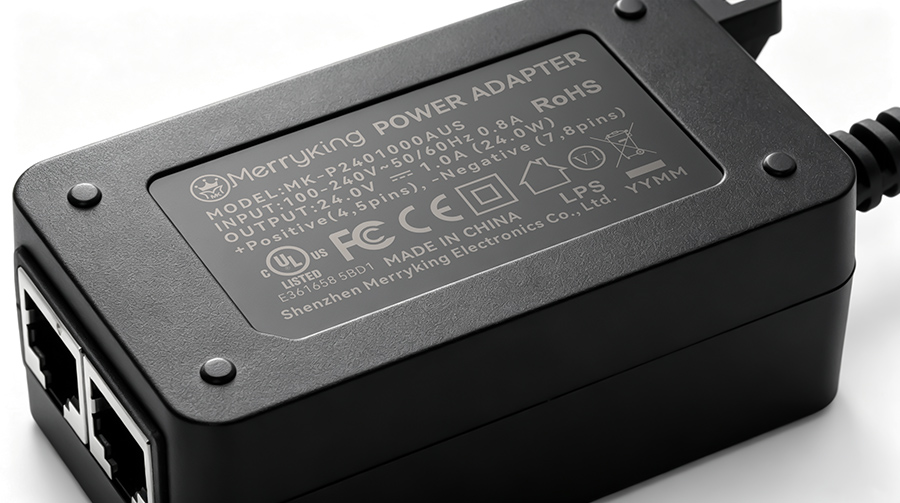
A Power over Ethernet adapter must incorporate multi-layered internal safety circuits to defend expensive corporate networks from electrical spikes. High-quality construction guarantees that local overloads will not cascade to destroy your connected core switches.
What Are the Crucial Protection Circuits?
Your devices must be protected from unexpected power spikes caused by lightning or grid issues. Here’s the deal: professional adapters use Over-Voltage Protection (OVP) to instantly block harmful voltage surges.
- Over-Current Protection (OCP) stops power surges.
- Short-Circuit Protection (SCP) isolates physical faults.
- Over-Temperature Protection (OTP) stops thermal runaway.
You can rest easy knowing these automatic safeguards will shield your valuable hardware investment.
Why Check for Official Global Certifications?
Uncertified power adapters are a massive liability that can lead to physical fire hazards. Think about it: global marks like UL, CE, and FCC prove the adapter has passed strict safety checks.
- Ensures compliance with building safety codes.
- Protects your business from structural liabilities.
- Guarantees clean, reliable electromagnetic emission limits.
You should never compromise on safety when running continuous power inside commercial structures.
Key Takeaway: Multi-layer safety designs and global regulatory stamps are non-negotiable for enterprise deployments.
| Safety Certification | Geographic Region | Primary Regulatory Focus | |
|---|---|---|---|
| UL Listed | North America | Electrical safety and fire prevention | |
| CE Mark | European Union | Health, safety, and environmental protection |
Prioritizing certified adapters prevents structural fires and protects high-value downstream server switchgear.
What Should B2B Buyers Check in a Power over Ethernet Adapter?

B2B buyers must evaluate a Power over Ethernet adapter based on component durability, operational temperatures, and vendor supply chain history. Conducting this technical analysis prevents early component failure across your corporate infrastructure.
Why Is MTBF Rating Critical for B2B Sourcing?
Frequent adapter failures lead to high maintenance costs and extended network downtime. Let’s face it: sourcing units with a high Mean Time Between Failures (MTBF) ensures years of uninterrupted service.
- Minimizes physical replacement labor costs.
- Provides long-term network predictability.
- Lowers total cost of ownership (TCO).
You will save money in the long run by avoiding low-quality, generic power units.
How to Vet a Manufacturing Partner’s Capability?
Your supply partner must maintain consistent component access to avoid project delays. You might be wondering: how do you verify a manufacturer’s capacity to deliver bulk orders?
- Review physical production capacity.
- Check component sourcing agreements.
- Evaluate direct localized support structures.
Selecting an experienced partner ensures you receive consistent quality across every production batch.
Key Takeaway: Comprehensive procurement vetting reduces downstream maintenance overhead and guarantees supply chain reliability.
| Buyer Checklist | Target Standard | Business Benefit | |
|---|---|---|---|
| MTBF Rating | > 100,000 Hours | Extends physical lifespans | |
| Operating Temp | -20°C to +60°C | Enables harsh environment use |
Thoroughly reviewing technical datasheets protects your company from unexpected product recalls and deployment delays.
How to Customize a Power over Ethernet Adapter for Devices?

Customizing a Power over Ethernet adapter allows enterprise businesses to match unique voltage requirements, casing shapes, and branding to proprietary hardware specifications. Working with an experienced manufacturer makes this design and production process seamless.
What Are the Advantages of Custom OEM Enclosures?
Off-the-shelf adapters often do not fit inside specialized outdoor housings or sleek retail kiosks. Believe it or not: custom-molded designs can cut your final product assembly time in half.
- Matches your exact corporate visual branding.
- Accommodates compact space limitations.
- Provides custom port orientations.
You can create a highly integrated hardware package that sets your brand apart.
How to Partner with an Experienced OEM?
Designing custom electrical devices requires deep technical engineering and strict safety testing. Best of all: working with a certified OEM PoE power adapter manufacturer ensures your product passes global standards with ease.
- Access to advanced 3D prototype modeling.
- Rigorous pre-compliance testing.
- Scalable factory production capacity.
Your engineering team will save months of development time by relying on proven power designs.
Key Takeaway: Collaborative OEM customization overcomes off-the-shelf physical limitations and matches proprietary hardware needs.
| Customization Stage | Buyer Input | Factory Output | |
|---|---|---|---|
| Engineering Draft | Physical and electrical parameters | 3D models and PCB schematics | |
| Production Run | Bulk purchase agreement | Fully certified custom adapters |
Partnering with a dedicated OEM developer turns specialized hardware designs into reliable, mass-market products.
Empower Your Network with MK Power Adapter
Are you ready to streamline your next network deployment with high-performance power hardware? At MK Power Adapter, we specialize in engineering industry-grade PoE power supplies, injectors, and custom-molded OEM solutions tailored exactly to your enterprise requirements.
Whether you need to power thousands of perimeter security cameras or customize a proprietary hardware bundle, our engineering team is here to help you scale.
Contact us today to consult with a B2B project specialist and request a custom quotation for your deployment.
Frequently Asked Questions
Can I use a PoE adapter on a non-PoE network switch?
Yes, you can easily use an active injector to bridge this gap. The injector plugs directly into your non-PoE switch, receives the raw data signal, adds the required DC power to the lines, and outputs a standard PoE connection to your remote device.
What is the best Ethernet cable to use with a PoE adapter?
The best choice is a solid copper Cat6 or Cat6A cable. Solid copper wires experience significantly less electrical resistance and thermal buildup over long distances compared to copper-clad aluminum (CCA) alternatives, ensuring safe power delivery up to 100 meters.
Can a PoE adapter damage devices that do not support PoE?
No, active PoE adapters are entirely safe because they perform a low-voltage negotiation handshake first. If the adapter detects that the receiving device is not PoE-compatible, it only transmits raw data, keeping your non-PoE hardware completely safe.
Can I run a PoE adapter outdoors?
Only if the adapter is explicitly rated for outdoor use with an IP67 weatherproof enclosure. Standard indoor PoE adapters will suffer physical damage from dust and humidity; therefore, they should be kept in a climate-controlled enclosure or dry environment.
How do I know if my device requires a PoE injector or splitter?
Your choice depends on the native capabilities of your device. If your security camera or wireless access point supports PoE but your switch does not, you need an injector; if your device does not support PoE but you want to run power over your Ethernet line, you need a splitter.